AGATE
AGATE helps to protect resources hosted by HTTP(S) services, such as an endpoint serving an object store. It must be used as a forward authorization service for the gateway (e.g. APISIX).
AGATE can be used to protect two types of resource: - role protected URLs: HTTP requests with a path and a method allowed by rules defined within roles - item-based assets: URLs linked to an item and containing the name of the collection and the ID of the item, such as an image
AGATE's item-based assets mecanism allows an access to a resource if the user is allowed to see the corresponding item in ARLAS. To find the corresponding item, AGATE extracts the collection name and the item id from the resource url. In other word, AGATE authorizes a request on a resource if:
- a collection name is found in the resource path
- an item identifier is found in the resource path
- a search on ARLAS Server with the user's token on the found collection name and found item id returns an item
AGATE's role protected urls allows a protected request only if the path matches a pattern and if the request method matches the allowed method. The pattern and methods are modeled as rules listed in a configuration file. Rules are grouped in roles. For that reason, we call it URL Role Based Access Control (URBAC). The roles listed in the jwt token of the request are used.
Configuration
Configuring AGATE's Role protected URLs
The configuration of the URL Role Based Access Control (URBAC) contains: - the path to the role file: the listing of the roles->rules->path/method. See the roles configuration documentation for more details. - the headers to use for retrieving the token and the url (jwks_uri) for validating the jwt token
Configuring AGATE's Item based assets
A configuration per service must be provided. A service configuration provides:
- a list of
public_url_patternsfor public resources: if matching, then AGATE authorizes the access - otherwise, a list of
url_patternsto extract the collection name and the item id. At least one is needed. - a
pattern_targetto tell AGATE where to look:- if undefined, then the pattern is matched against the path
- if
query.{param}then the{param}* query parameter is used - if
query.{param}.url.paththen the path contained in the{param}* query parameter is used - if
query.{param}.url.querythen the query contained in the{param}* query parameter is used
*change {param} with the parameter name of your choice.
For instance, to protect the access on asset files from airs, the pattern is:
(/collections/)(?P<collection>[^/]+)/items/(?P<item>[^/]+)/assets/(?P<asset>[^/]+)
(/collections/)(?P<collection>[^/]+)/items/(?P<item>[^/]+)/assets/thumbnail
The following configuration protects the access cog visualization with titiler. This way, only COGs linked to items the user sees can be visualized.
  cog:
    jwt_name: authorization
    jwt_location:
      - headers
      - query_params
    private:
      - pattern: (/airs-storage/)(?P<collection>[^/]+)/items/(?P<item>[^/]+)/assets/(?P<asset>[^/]+)
        part: query.url.url.path # takes the query parametters, use it as a url, then extract the path
The configuration can also specify the header AGATE must use to find the requested URI with url_header. APISIX uses X-Forwarded-Uri.
For more details, see the AGATE API documentation
Configuring APISIX
Below is an APIXSIX configuration example to protect assets served by myservice:
routes:
 -
    uri: /myservice/*
    methods: ["GET"]
    upstream:
      nodes:
        "minio:9000": 1
    plugins:
      forward-auth:
        uri: http://agate:8004/agate/authorization/myservice
        request_headers: ["Authorization", "arlas-org-filter"]
Note the headers Authorization and arlas-org-filter are required: AGATE includes them in ARLAS Server requests so that it can determine the identity of the user.
Sequence description
Role protected URLs
Item based assets
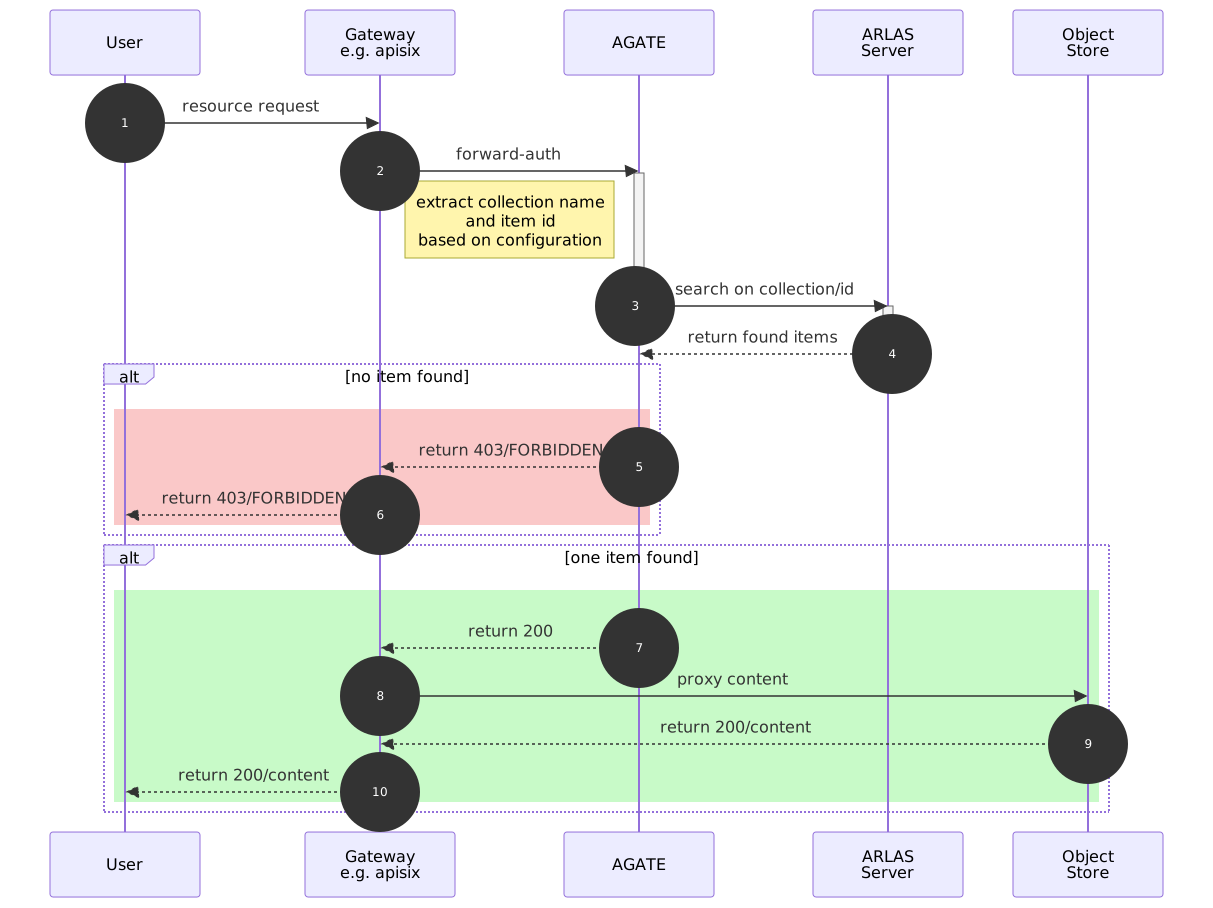
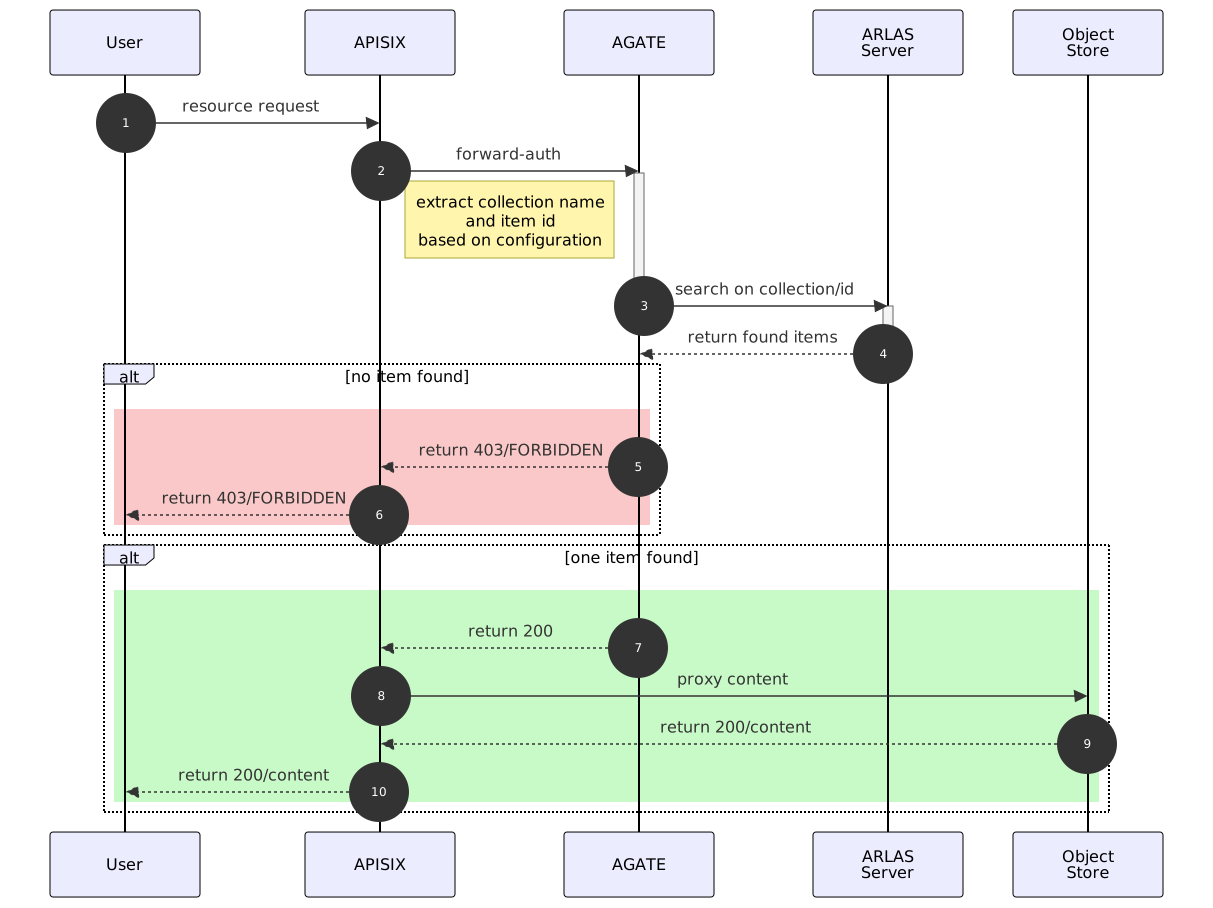
When APISIX receives an incoming request matching a forward-auth on AGATE (e.g. myservice), it requests the service /agate/authorization/myservice on AGATE.
The request contains 3 important headers: Authorization, arlas-org-filter and X-Forwarded-Uri. The last one is used to extract the collection name and the item id. AGATE makes an ARLAS Server search request along with the two first headers.
If ARLAS Server does not return any hit, then AGATE returns the 403 status code and APISIX refuses the access to the requested resource.
If ARLAS Server returns a hit, this means that the item is "visible" to the user, AGATE returns the 200 status code and APISIX proxies the requested content.